8:00 AM – 9:45 AMConnect your calendar
every calendar you have,
on one screen
Every event from all your Google accounts on one screen, ready to edit.
Connect your calendar Connect every Google account you have and you are in. No new account, no extra password.
Download for Windows Download for Android Download for iPhone and iPad Download for Ubuntu (.deb) Get the app Other platforms
- Web
- Windows, macOS and Linux
- Apps
- iOS, Android, Windows and Ubuntu 24.04 (AMD64)
- Accounts
- Google, Microsoft (Outlook) and Apple
- Price
- Free
9:45 AM – 10:45 AMThe problem
The problem
your life does not fit in one account
-
Your schedule is spread across several accounts
Each account shows a slice of your day. None shows the whole day.
-
You agree on times one time zone at a time
It is mental arithmetic, and the wrong answer costs the meeting.
-
You send free slots that were never free
The commitment was in the other account.
-
You get interrupted mid-meeting
Whoever interrupted had no way to see that you were busy.
10:45 AM – 1:00 PMScheduling
Scheduling
one link, and the free slots are genuinely free
Cuco checks every connected account before it offers a slot. What shows as free is free.
- Outlook
- Apple
- What the link offers
-
01
Connect your accounts
Authorise with the provider itself. No password goes through Cuco.
-
02
Generate the link
With your real availability, across every connected calendar.
-
03
They pick a time
The slot lands in your calendar, clear of your other accounts.
AfterLink down and still being opened? Cuco tells you.
1:00 PM – 2:15 PMFeatures
Features
one screen is where it starts,
not where it ends
-
Every calendar in the same place
Create, edit and move events from any account without changing tabs.
-
More than one zone at a time
Side by side on the same grid, nothing to convert.
-
Fine control over what shows
Calendar by calendar or by address, shared ones included.
-
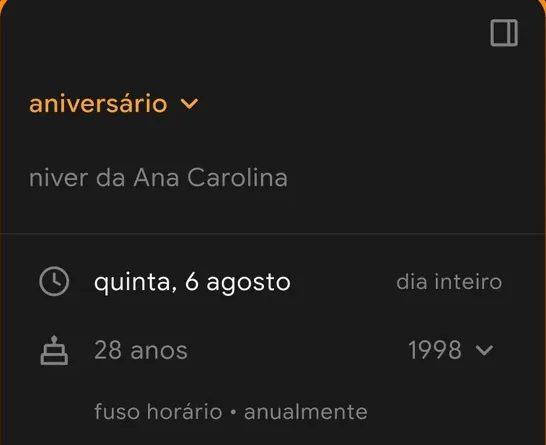
Birthday events
Shows the age the person is turning that year.
-
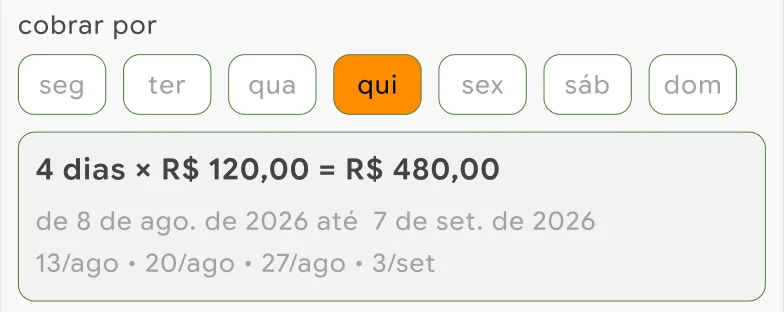
Payment by Pix
Fixed or per day: Cuco counts the days in the period and makes the link or QR Code.
2:15 PM – 3:15 PMShortcuts
Shortcuts
fast if you are in a hurry,
simple if you just arrived
More day per screen, less scrolling. Every shortcut has a button that does the same thing.
- C new event
- T today
- ←→ previous and next period
- ↑↓ scroll the grid
- DWM day, week, month
- 1–9 show 1 to 9 days
- E edit the selected event
- Del delete the selected event
- CtrlZ undo
- CtrlK command palette
- Esc close the panel
- ? this list, inside the app
3:15 PM – 4:30 PMYour data
Your data
what Cuco reads,
and what it never reads
Cuco is a calendar application for Google, Microsoft (Outlook) and Apple accounts. It shows and manages those calendars on a single screen.
- Reads
- Your calendar list and the events in each one, in every account you connect, shared calendars included. Never mail, files or contacts.
- Writes
- Event data, and only when you ask: create, edit, move or delete an event.
- Stores
- Your preferences and each account’s authorisation, encrypted. Each provider’s calendar remains the source of truth: Cuco keeps no server-side copy of your calendars.
- Never
- Advertising, tracking, training models, selling this data.
4:30 PM – 6:00 PMNew event
start with one account,
bring the rest later
Connect a Google account and your schedule appears at once.
- AcceleratorStart NEU · Entrepreneurship Centre, USP
BASE ESPM - AwardService Design · Prêmio Nacional Diseña México 2025
- ProgrammeVAI TEC 10th edition · Adesampa
SP Global Tech 2024
Something missing, or something broken? Tell us